競新資訊SOEASY電腦|華碩 ROG Strix XG259QNS(2H1P/IPS/380Hz/HDR400)可升降旋轉顯示器
華碩 ROG Strix XG259QNS(2H1P/IPS/380Hz/HDR400)可升降旋轉顯示器
分期試算
6 期 - 每月 1740 元
9 期 - 每月 1182 元
12 期 - 每月 903 元
18 期 - 每月 624 元
24 期 - 每月 485 元
36 期 - 每月 327 元
9988

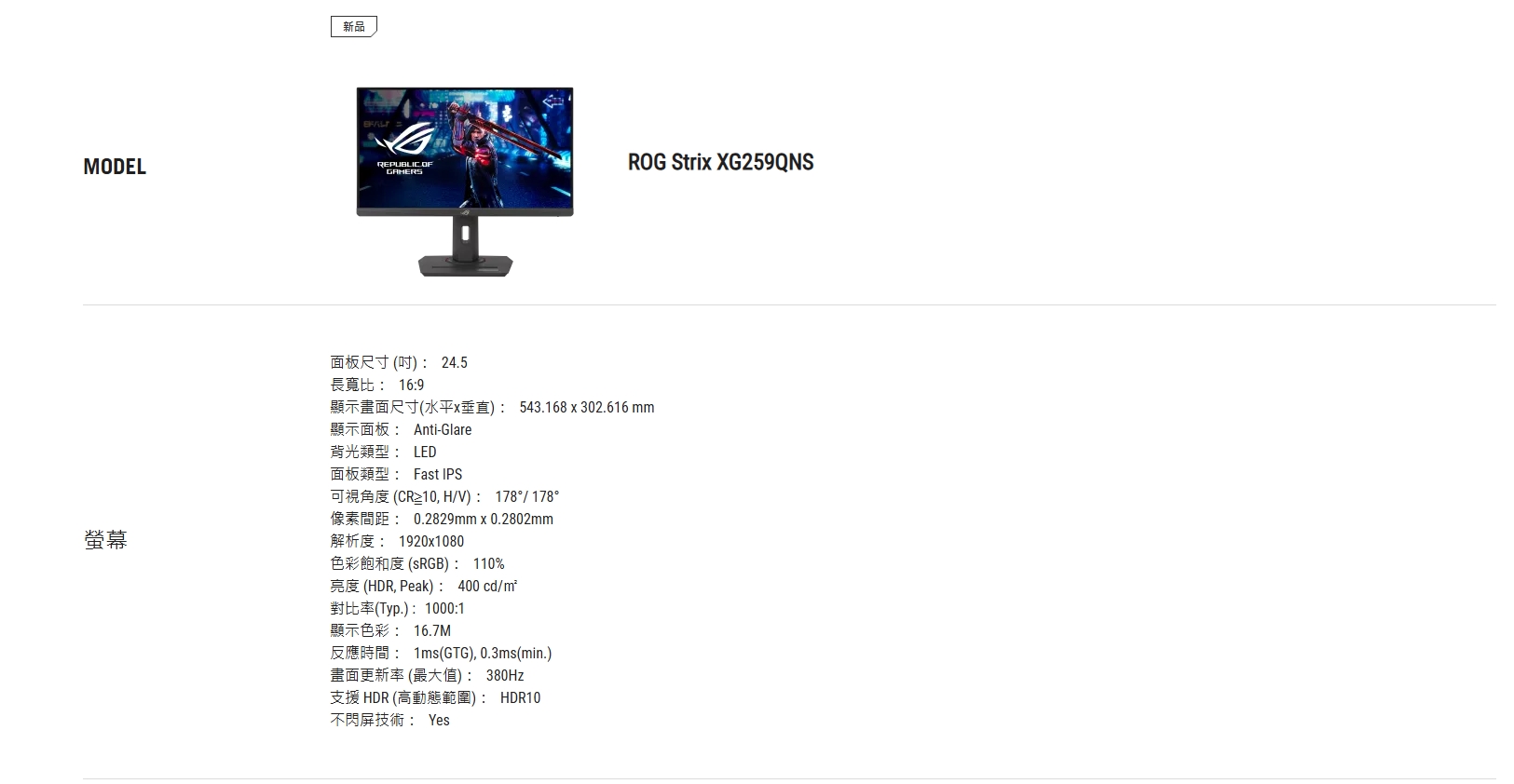
✦ 380Hz 超高速畫面更新率
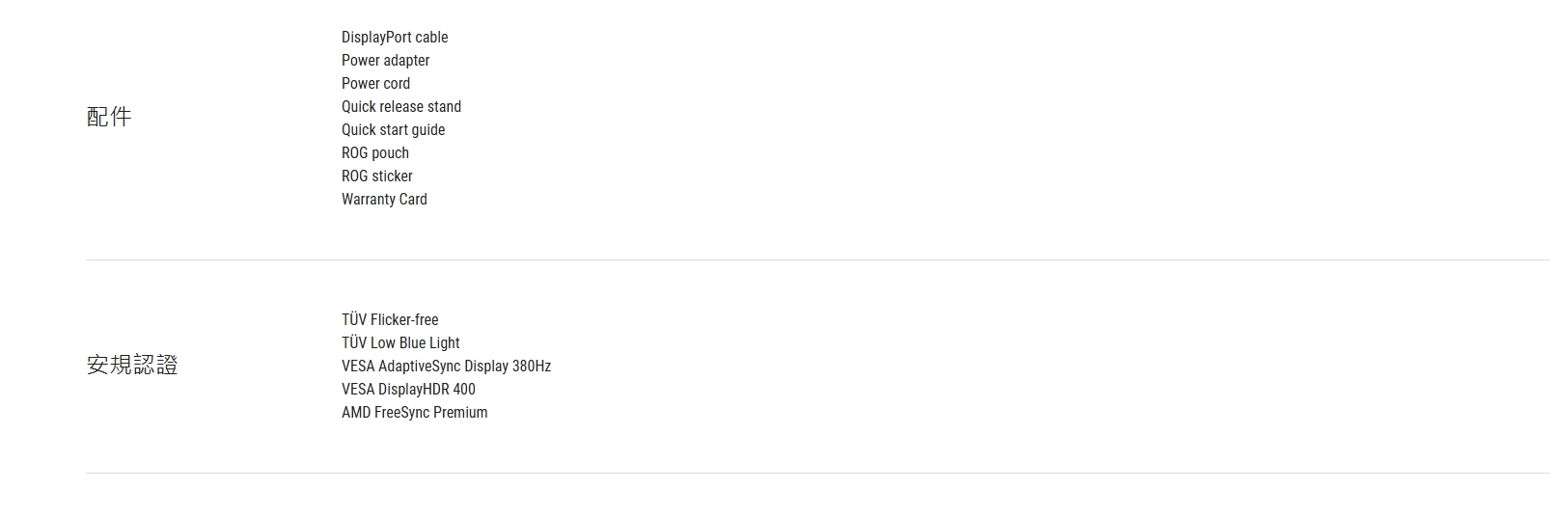
✦ HDR400認證
✦ 支援HDMI 2.0*2/DP 1.4/USB *2

-+


Gamer entric DesignA mobile phone socket in the base so your can place your cell phoneright in front of you that you dont miss out any messages And a inch tripod socket on the monitor stand allows users to mount acamera or additional display for streaming setupRG STRX XG259QNSTHE PERFECTBALANCE FAST IPS AdaptiveSync DisplayHDR 40010X03ms4SINCREDIBLY FAST3HZ OCREFRESH RATEYoull experience amazinglyfluid gaming visuals givingyou the upper hand in firstperson shooters racing, real-time strategy and sports titles Display-03ms min.Response Time  Display-ASUS Fast IPS Display allows the displaysliquid crystal elements to switch up to 10X faster than conventionalIPS panels for improved response. With a 0.3ms response timeminimum), smearing and motion blur are virtually eliminated.380 Hz60HzAdaptive-Sync offAdaptive-Sync onDISPLAYFreeSyncPremiumAdaptiveSync 380Tearing Free GameplayThe  Strix monitor features AMD FreeSync Premium technology,ensuring super-smooth, tear-free visuals with low latency.EXTREME LOW MOTI BLUR SYNCADAPTIVE-SYNConELMBonWith ELMB SYNC, you can enable ELMB (low-motion-blur technology) and Adaptive-sync at the same time, eliminating ghosting and tearing for sharp visuals andhigh frame rates while gaming.ACCURATE, WIDERCOLOR PALETTEProvides a wider range of colors with 110%  color gamut.To ensure color accuracy, all the XG monitors comes with E-calibration report.ASUS  ASUS Select ModeGameVisual mode settingsSystem SettingsImage Light   Application SettingsASCR 110%SCENERYRACINGSaturation80254 .CompareHDRHIGH DYNAMIC RANGE (HDR)WITH DISPLAYHDRM 400ConventionalASUSDISPLAYWIDGETCENTERThe NEW DisplayWidget Center software lets users easilychange monitor settings via an intuitive interface, using amouse - so theres no need to access the OSD menu. Also,you can check you color calibration report through thedevice info with easy access. Learn more here.Multi HDR ModeHIGH DYNAMIC RANGE (HDR) WITHTMDISPLAYHDRM 400HDR technology supports across a range of luminance to deliver a wider color range and higher contrast than traditional monitors. The brightest whites and the darkestblacks bring out details like never before. Also, it can get peack brightness of 400 nits to meet the requirement for DisplayHDR 400 certification.HDR VESA CERTIFIEDDisplayHDR 400HDR -gameenhancementsGaming  technologyGamePlusGameVisualFlicker-FreetechnologyUltra-Low BlueLight technologyThe ROG Gaming Artificial Intelligence technology, integrating Dynamic shadow boost, Variable OD and Dynamic cross  enhance users experience in gaming.Dynamic Shadow Boost Dynamic CrosshairDynamic Cross hairCFEngineeringRich connectivityErgonomic designRich connectivityExtensive connectivity options, including, I/O: DisplayPort1.4, two  () support a wide array of multimedia devices. OFROG ON    DisplayPortHDMI () HDMI (v2.0)earphone jack() 3.2 Gen 1Type-Ax2

LINE 客服